Weighbridge software Weighbridge ticketing that knows it is weighing waste.
OpenWeigh Waste takes a load from the registration to a completed, priced and printed weighbridge ticket — with the waste described properly on the way through.
The ticket
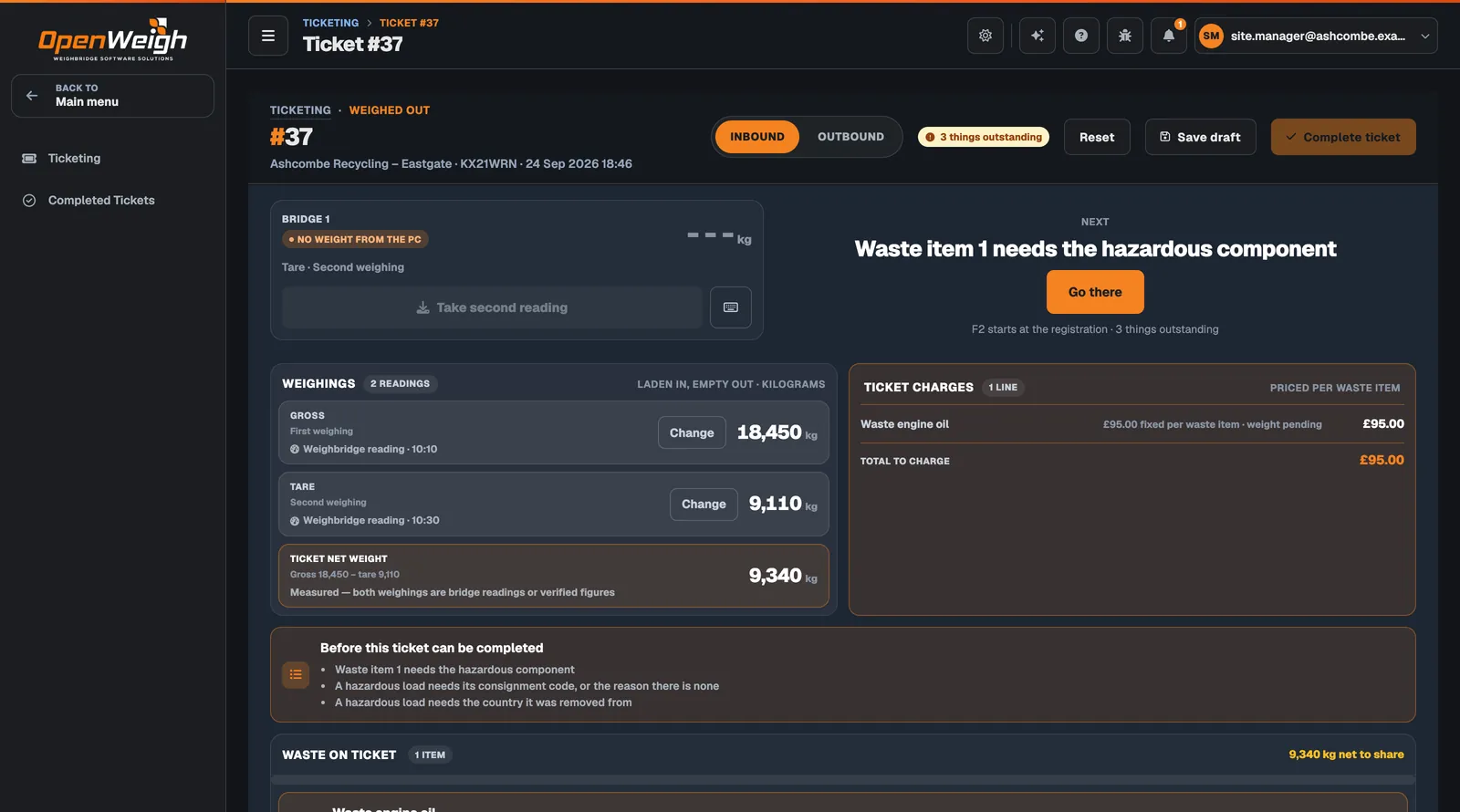
Everything about the load, on one screen.
The ticket screen is laid out for the person at the weighbridge window: the bridge, the weighings, the charge and the waste, with the next step spelt out.
- 1 · Weighings
First, second, stored tare
Laden in, empty out — or the vehicle’s stored tare. Every figure is labelled as a weighbridge reading, a stored tare or a manual entry, with the time it was taken.
- 2 · Waste items
One load, several wastes
Share the net weight across waste items by split weighing, pre-weighed figures, a percentage, an equal split or the remainder. Each share records how it was made and by whom.
- 3 · Completion
Nothing left outstanding
The ticket lists what stops it completing — a hazardous component, a consignment code, the country of origin — and takes the operator to each one.

Measured means measured.
The net weight says how it was reached. Measured means both weighings are bridge readings or verified figures. A weight typed in by hand is shown as a manual entry, so nobody mistakes one for the other later.
Changing a weighing is a deliberate action on the ticket, not a silent edit.
The board
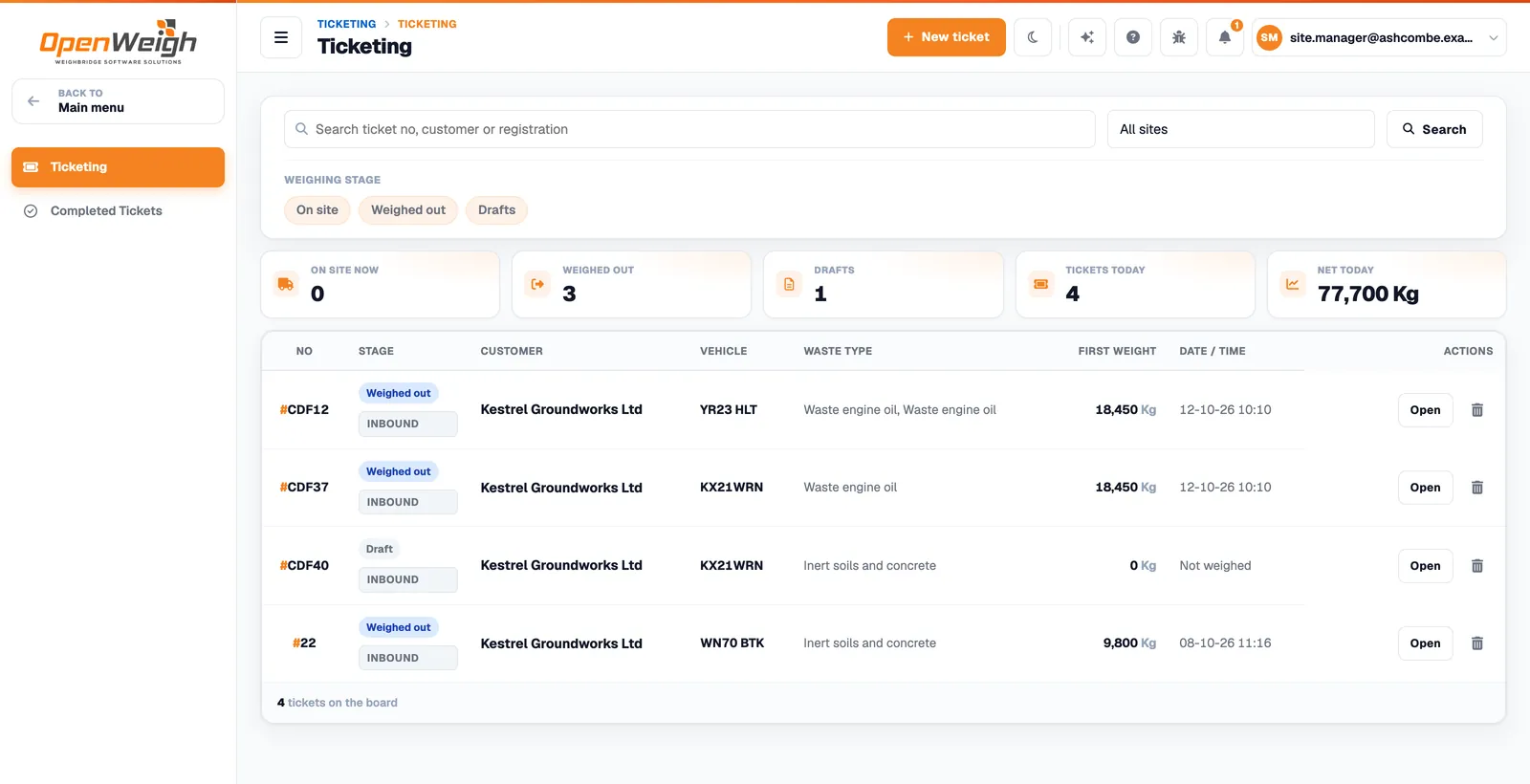
Who is on site, and what still needs doing.
The Ticketing board is the live list of open tickets and drafts. Filter by stage and site, search by ticket number, customer or registration, and open any ticket in one click.
Charges and the printed ticket
Priced from your rates. Printed on A4.
Rates are set per waste type for every customer and site, or for a specific customer or site. The most specific rate in force on the day applies.
- Per tonne, per kilogram, per load or fixed. Each rate states its own basis. Weight-based charges use a measured weight, never an estimate.
- Overrides are recorded. A permitted user can override a charge; the charge applied is kept with the completed ticket.
- A ticket that says everything. Receiving site, parties, site authorisation, weights, waste with EWC, hazardous, POPs and recovery or disposal details, and the charge.

Weighbridge connection
Software in the browser. Hardware on your site.
The Weight Agent is the only part that runs at the site. It reads the indicator and sends readings outward to OpenWeigh; the ticket screen never connects to the indicator itself.
Weighbridge indicator
Your existing indicator and load cells.
Weight Agent
A Windows service on a PC at the site that reads the indicator.
Weight Gateway
Receives readings from each site’s agent.
Ticket screen
The reading arrives on the ticket, in the browser.
Readings travel from the weighbridge indicator over RS-232 or Ethernet to the Weight Agent on a site PC, then over an outbound secure WebSocket to the OpenWeigh Weight Gateway, and on to the ticket screen in the browser.
Connections: RS-232 serial or Ethernet (TCP) to the indicator.
Network: outbound only — no VPN, no inbound ports.
Browser: never talks to the indicator directly.
- 1 · Connect
RS-232 or Ethernet
The agent reads the indicator over a serial COM port or raw TCP on the site network. It runs as a Windows service.
- 2 · Commission
A guided walk per bridge
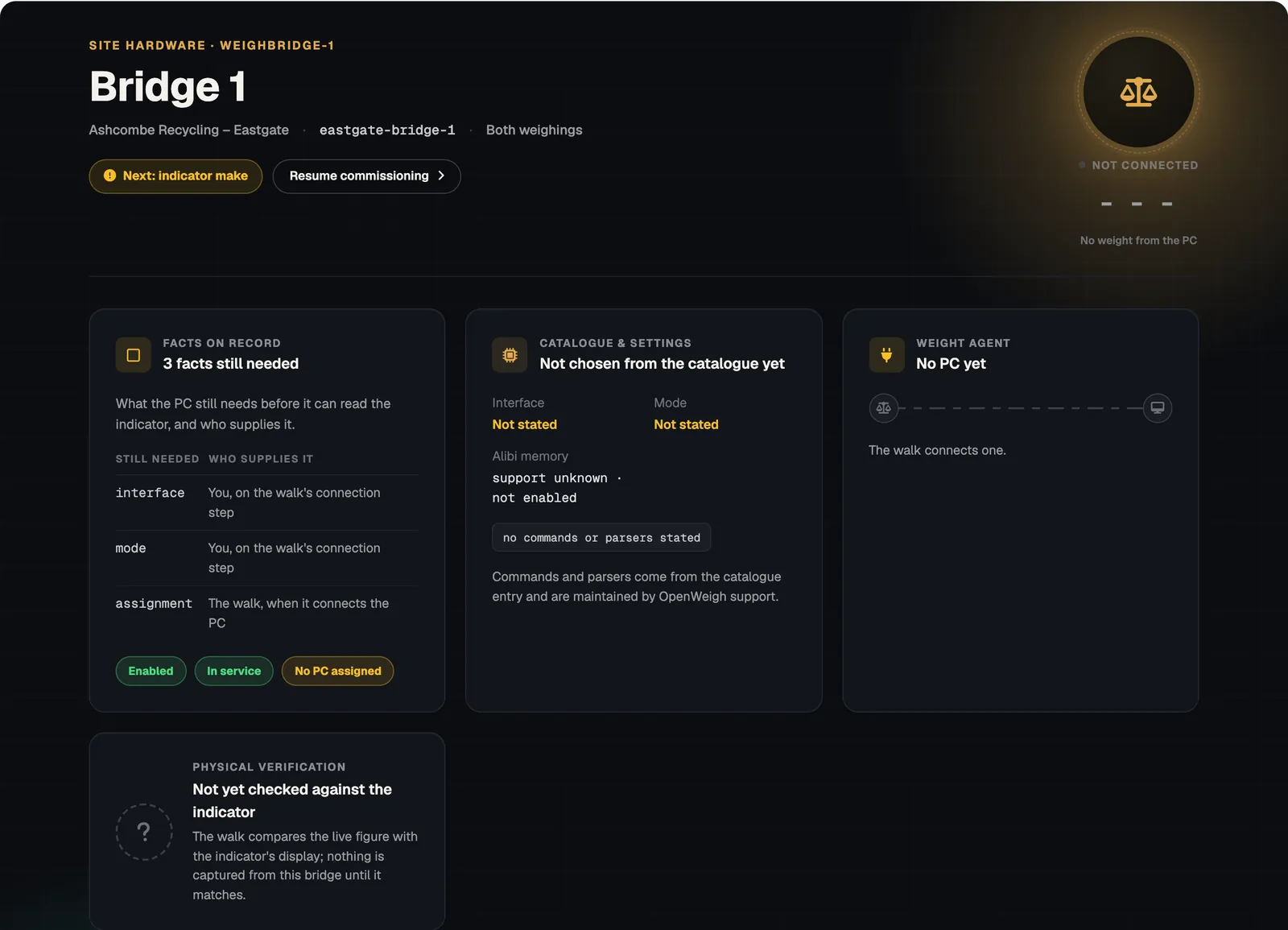
Each weighbridge is set up in a guided walk that records the indicator, how it connects and which PC reads it.
- 3 · Verify
Checked against the display
The live figure is compared with the indicator’s own display before any reading from that bridge is used on a ticket.
Audit
Every reading accounted for.
Readings from the bridge are evidence in their own right. The Bridge Log and Weighing Transactions keep what the weighbridge recorded, and a reading that no ticket claims stays there for review.
- Bridge Log. Individual weighing activity as the weighbridge recorded it.
- Weighing Transactions. Paired first and second weighings with their net weight and pairing status.
- Camera observations. ANPR and other camera observations can be recorded as evidence alongside weighings.
Can we use OpenWeigh before the weighbridge is connected?
Yes. Weights can be entered by hand until a bridge is connected and verified. Manually entered weights are labelled as such on the ticket.
Which indicators are supported?
The Weight Agent reads indicators over RS-232 serial or Ethernet (TCP). Indicator settings come from OpenWeigh’s catalogue and are maintained by OpenWeigh support, so tell us your make and model before you plan the connection.
Does the site need a VPN or firewall changes?
No inbound ports and no VPN. The Weight Agent makes an outbound secure WebSocket connection to OpenWeigh.
Can tickets handle loads that are not waste?
Yes. A ticket is either a waste ticket, with one or more waste items, or a product ticket for non-waste transactions.
Get started
Ready for the next load on the bridge?
Sign up online, set up your first site and put your next ticket through OpenWeigh Waste.
Already using OpenWeigh? Sign in